Highly Available Pi-hole with Keepalived and Nebula Sync
Run Pi-hole redundantly: Keepalived for a shared VIP and Nebula Sync for database replication – this is how HA DNS works in a homelab.
TL;DR – Two Pi-hole instances, one virtual IP via Keepalived (VRRP), database synchronization via Nebula Sync. If one node goes down, the other takes over the VIP within seconds. Gravity Sync is dead – Nebula Sync is its successor.
A single Pi-hole is the Achilles heel of any homelab that depends on it. The host reboots, an update runs, or the Raspberry Pi just dies – and suddenly nothing works across the entire network because DNS is gone. The solution is a highly available setup with two Pi-hole instances, a shared virtual IP, and a synchronized database.
Gravity Sync used to be the go-to tool for replication. The project has been inactive for a while and is no longer maintained. The current successor is Nebula Sync – a Go-based tool that uses the Pi-hole API and is significantly more modern.
Architecture and Prerequisites
The core idea is straightforward: two hosts run in parallel, both with Pi-hole. Keepalived manages a Virtual IP (VIP) via VRRP. All clients on the network get this VIP configured as their DNS server – not the individual IPs of the hosts. If the primary node fails, the standby node takes over the VIP within a few seconds.
For this setup you need:
- Two hosts (Raspberry Pi, VM, LXC container – doesn’t matter) on the same L2 segment
- Pi-hole installed on both hosts
- Keepalived on both hosts
- Nebula Sync on one of the hosts (or as a separate container)
- A free IP in the subnet for the VIP
Example IPs for this article:
- Node 1 (Primary):
192.168.1.10 - Node 2 (Secondary):
192.168.1.11 - VIP:
192.168.1.10
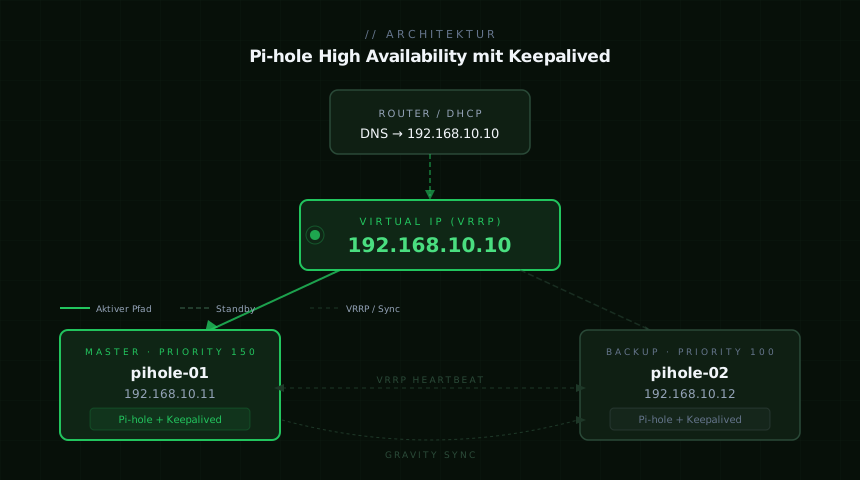 Both nodes run actively, the VIP sits on the primary. On failure, the secondary takes over.
Installing Pi-hole
Install Pi-hole on both nodes – either via the classic installer or as a Docker container. Important: on Node 1, Pi-hole is configured with the real IP 192.168.1.10, on Node 2 with 192.168.1.11. The VIP 192.168.1.5 is added later by Keepalived.
For Docker-based setups, the following Compose file works well (identical on both nodes, just adjust the IP):
services:
  pihole:
    image: pihole/pihole:latest
    container_name: pihole
    network_mode: host
    environment:
      TZ: Europe/Berlin
      WEBPASSWORD: "secure-password"
      FTLCONF_LOCAL_IPV4: "192.168.1.10" # On Node 2: 192.168.1.11
    volumes:
      - ./etc-pihole:/etc/pihole
      - ./etc-dnsmasq.d:/etc/dnsmasq.d
    restart: unless-stopped
network_mode: host is important here so that Keepalived can later bind the VIP directly to the host’s interface and Pi-hole listens on it.
Configuring Keepalived
Install Keepalived on both nodes:
sudo apt update && sudo apt install keepalived -yConfiguration on Node 1 (Primary) – /etc/keepalived/keepalived.conf:
vrrp_script chk_pihole {
    script "/usr/bin/pgrep pihole-FTL"
    interval 2
    weight -20
    fall 2
    rise 2
}

vrrp_instance VI_1 {
    state MASTER
    interface eth0
    virtual_router_id 51
    priority 110
    advert_int 1

    authentication {
        auth_type PASS
        auth_pass secret-password
    }

    virtual_ipaddress {
        192.168.1.5/24
    }

    track_script {
        chk_pihole
    }
}
Configuration on Node 2 (Secondary) – identical, but with state BACKUP and priority 100:
vrrp_script chk_pihole {
    script "/usr/bin/pgrep pihole-FTL"
    interval 2
    weight -20
    fall 2
    rise 2
}

vrrp_instance VI_1 {
    state BACKUP
    interface eth0
    virtual_router_id 51
    priority 100
    advert_int 1

    authentication {
        auth_type PASS
        auth_pass secret-password
    }

    virtual_ipaddress {
        192.168.1.5/24
    }

    track_script {
        chk_pihole
    }
}
The vrrp_script block is critical: it checks whether pihole-FTL is running. If not, the node’s priority drops by 20 points – the secondary automatically takes over the VIP.
Start Keepalived on both nodes:
sudo systemctl enable keepalived --nowRunning ip addr show eth0 on Node 1 should now show the VIP 192.168.1.5.
Setting Up Nebula Sync
Nebula Sync replicates the Pi-hole configuration (blocklists, allowlists, DNS entries, settings) between instances. It uses the Pi-hole API v6 and is therefore compatible with Pi-hole v6+.
Note: Gravity Sync has not been actively maintained since 2023 and no longer works reliably with Pi-hole v6. Nebula Sync is the community successor.
Nebula Sync is easiest to run as a Docker container – either on one of the Pi-hole hosts or on a separate system:
services:
  nebula-sync:
    image: ghcr.io/lovelaze/nebula-sync:latest
    container_name: nebula-sync
    environment:
      PRIMARY: "http://192.168.1.10|admin-password-node1"
      REPLICAS: "http://192.168.1.11|admin-password-node2"
      FULL_SYNC: "true"
      CRON: "*/5 * * * *"
      TZ: Europe/Berlin
    restart: unless-stopped
Environment variables explained:
PRIMARY: URL and password of the primary Pi-hole instance (format:URL|password)REPLICAS: URL and password of the replica instance(s), comma-separated for multipleFULL_SYNC: Synchronizes all settings, not just GravityCRON: Sync interval – every 5 minutes is a good starting point
After starting, check the logs:
docker logs nebula-sync -fA successful sync looks something like this:
INFO Sync started
INFO Syncing gravity from primary to replica
INFO Syncing settings from primary to replica
INFO Sync completed successfully
DNS Configuration and Clients
All clients on the network now get only the VIP 192.168.1.5 configured as their DNS server – best done via the DHCP server (router, OPNsense, etc.). The individual IPs of the nodes are irrelevant to clients.
Optionally, you can add a public resolver like 1.1.1.1 as a secondary DNS server – as a last resort fallback if both Pi-hole nodes go down simultaneously. This is a trade-off between availability and consistent ad-blocking.
In OPNsense under Services > DHCPv4 > [Interface]:
DNS Server 1: 192.168.1.5
DNS Server 2: 1.1.1.1  # Optional, as fallback
A quick test:
# Test failover: stop Pi-hole on Node 1
sudo systemctl stop pihole-FTL  # or: docker stop pihole

# VIP should now be on Node 2
ping 192.168.1.5

# Test DNS resolution
dig @192.168.1.5 example.com
Conclusion
The setup is manageable in complexity, but the gain in reliability is significant. Keepalived handles VIP management reliably and quickly, Nebula Sync keeps the configuration consistent. Anyone still running Gravity Sync should migrate soon – Pi-hole v6 changed the internal database structure, and Gravity Sync can no longer handle it.
One thing to keep in mind: Nebula Sync synchronizes on an interval, not in real time. Changes to blocklists or DNS entries on the primary take up to 5 minutes to reach the secondary. For a homelab, that’s completely acceptable.
The next logical upgrade would be running the Pi-hole instances in LXC containers on Proxmox and configuring Keepalived directly on the containers – but that’s a separate article.